Password Change vs Password Reset: Account Security Ka Difference
Compare password change and password reset for Jai Club-related accounts. Learn the differences in existing access, identity verification, recovery codes, active sessions and password safety.
In this article
- Password Change vs Password Reset: Quick Comparison
- Password Change Ka Matlab Kya Hai?
- Password Reset Kya Hota Hai?
- Current Password vs Recovery OTP
- When Should a Password Be Changed?
- When Is Password Reset More Appropriate?
- Password Reset OTP Kaise Work Karta Hai?
- Recovery Link vs OTP: What's Different?
- Does Password Change Log Out Other Devices?
- Password Reset vs Account Unlock
- What Happens to Saved Passwords?
- Example: Password Change While Signed In
- Example: Password Reset After Forgetting Login Details
- Password Change Failed: Common Reasons
- Password Reset Failed: Common Reasons
- Fake Password Reset Pages and Account Safety
- How to Compare Password Security Properly
- Frequently Asked Questions
- What is the difference between password change and reset?
- Do I need my old password to change it?
- Can I reset a password without knowing the old one?
- Does a reset always require an OTP?
- Will a password reset unlock a restricted account?
- Are recovery codes safe to share with support?
- Does changing my password log out other devices?
- Why does my saved password stop working after a change?
- Can this independent website reset a Jai Club password?
- Conclusion
- Sources and Editorial Method
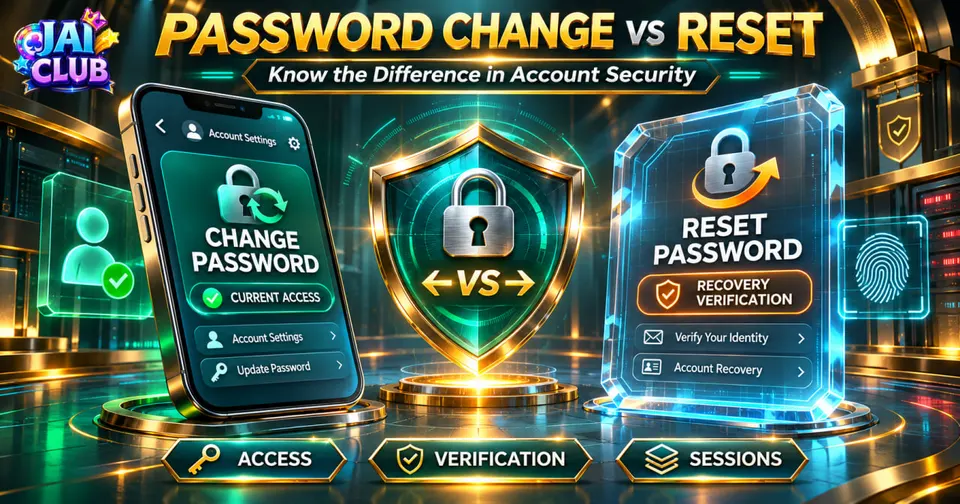
Password change and password reset are two different ways of updating an account password. A password change is normally used when a person can still access the account and wants to replace the existing password. A password reset is generally used when the person has forgotten the password or cannot sign in.
Both processes can create a new password, but their security requirements are different. A normal change may require the current password or another form of re-authentication, while a reset generally requires the account holder to prove ownership through a recovery process.
This comparison explains how the two processes work, why verification matters, what happens to existing sessions and how readers can avoid fake recovery pages. It is relevant to people researching Jai Club login issues, but it does not claim that every service using the Jai Club name provides identical password-management controls.
Password Change vs Password Reset: Quick Comparison
The main difference is whether the account holder still has normal access.
A password change generally begins from an authenticated account or security-settings page. A reset begins through a recovery process that allows access to be restored without using the forgotten password.
| Feature | Password change | Password reset |
|---|---|---|
| Typical situation | User can access account | User cannot remember password |
| Normal starting point | Account security settings | Forgot Password process |
| Existing password | May be required | Normally not required |
| Identity confirmation | Existing session plus security checks | Recovery code, token or other verification |
| Main purpose | Replace known credential | Restore access |
| Security concern | Unauthorised account changes | Fraudulent recovery attempts |
| Existing sessions | Depends on service | May need to be invalidated |
| Exact Jai Club implementation | Must be verified | Must be verified |
The processes can overlap. For example, someone who is still signed in may choose a reset process because the current password is unknown. However, the underlying identity-verification requirements remain important.
Password Change Ka Matlab Kya Hai?
Password change is a security action in which an existing account password is replaced with a new one. It normally takes place after the account holder has already authenticated successfully.
A service may ask for the current password before allowing the change. Other services may require a fresh verification step, especially when the account has recently been accessed from an unfamiliar device.
The purpose is to prevent an unauthorised person from changing the password merely because they gained temporary access to an unlocked browser or phone.
A familiar account interface should not be treated as proof of authenticity. Before changing sensitive credentials, users should verify that they are using the intended service and not an imitation login page.
Password Reset Kya Hota Hai?
Password reset is an account-recovery process that allows a legitimate account holder to establish a new password after losing access to the previous one.
The process generally begins with an identifier such as a registered mobile number or email address. The service may then send a recovery code or link through an approved channel.
The code or token is intended to confirm that the person requesting the reset can access the relevant recovery method. Successful verification allows the service to accept a new password.
The exact recovery method depends on the operator. This article does not assume that all Jai Club-related services use SMS OTP, email links or the same combination of checks.
Current Password vs Recovery OTP
A current password and a recovery OTP are not interchangeable.
A current password is the account's existing authentication secret. A recovery OTP is normally a temporary code used during an authorised verification flow.
For example, changing a password through account settings may require entering the old password and a new one. Resetting a forgotten password may involve confirming access to the registered recovery channel instead.
A recovery code should never be shared with an unknown support contact. Its temporary nature does not make it harmless.
When Should a Password Be Changed?
A password change may be appropriate when a person still has account access but wants to replace an old or potentially exposed credential.
Examples include discovering that the password was reused on another website, recognising that someone else may know it, or deciding to replace an insecure password.
A change can also be relevant after a security warning. However, if an account may already be compromised, simply changing the password might not be sufficient.
The account holder may also need to review recovery information and active sessions, depending on the service's security features.
When Is Password Reset More Appropriate?
A reset is generally more appropriate when the user cannot authenticate with the existing password.
For example, an account holder may remember the registered mobile number but not the password used during registration. The verified recovery process is intended for that situation.
A reset may also be necessary after a service requires additional account recovery.
The most important requirement is that the recovery process belongs to the intended service. An unknown website offering to recover accounts through a referral code, deposit or special application should not be treated as a legitimate alternative.
Password Reset OTP Kaise Work Karta Hai?
A secure recovery system may generate a temporary code linked to a particular account-recovery request.
The code should be difficult to guess, expire after an appropriate period and become unusable after successful use. These are recommendations described in OWASP's Forgot Password Cheat Sheet.
The account should not be changed merely because a recovery request was submitted. The required verification must be completed first.
A code that has expired or belongs to an earlier recovery request may be rejected even if its digits were originally correct.
The exact code length, validity period and retry limits must come from the actual service rather than an assumed universal Jai Club policy.
Recovery Link vs OTP: What's Different?
An OTP is usually a short code entered into a verification form. A recovery link may contain a unique token allowing a limited password-reset action.
Both methods serve the broad purpose of proving account ownership through an approved recovery channel.
A recovery link should not be forwarded to another person, because possession of the valid token may allow the password-reset process to continue.
Users should also be cautious when a link arrives unexpectedly. A legitimate-looking message can still direct someone to an unrelated website.
The most reliable approach is to begin recovery through a previously verified service rather than opening unfamiliar links from social media.
Does Password Change Log Out Other Devices?
It depends on how the service manages authenticated sessions.
Some platforms invalidate existing sessions after a password change or reset. Others may provide a separate option to sign out of all devices.
OWASP recommends considering existing sessions as part of password-recovery security. This is especially important after suspected account compromise.
Changing the password does not automatically prove that every older session was terminated unless the service confirms that behaviour.
Readers should check available account-security controls rather than assuming all platforms follow the same policy.
Password Reset vs Account Unlock
A password reset updates the credential. Account unlock concerns an access restriction.
These are different operations.
For example, a service may temporarily restrict sign-in after repeated incorrect attempts. Resetting the password might be part of the recovery process, but it does not universally guarantee that a separate restriction disappears.
Likewise, an account can be unlocked and still reject an incorrect password.
For broader authentication guidance, read our Jai Club Login and Account Access guide, which explains common account-access and security problems.
What Happens to Saved Passwords?
Browsers and password managers can store account credentials for convenience. After a password change, the saved entry may continue using the old value until it is updated.
This can create confusion when a user successfully changes a password on one device but receives an incorrect-password message on another.
The first step is to confirm that the stored credential belongs to the correct verified domain.
A password saved for a similarly named website should not automatically be used on another service.
Our app versus browser comparison explains why mobile applications and browsers may maintain different saved information and login sessions.
Example: Password Change While Signed In
Consider a fictional account holder who is already signed in through a verified service.
The person opens the account-security page, completes any required re-authentication and enters a new password.
After the change is accepted, the current service may ask the user to sign in again or update other sessions according to its policy.
This example illustrates the usual purpose of a password change. It does not describe a confirmed Jai Club screen or prove that a particular operator provides these exact controls.
Example: Password Reset After Forgetting Login Details
In a second fictional example, the account holder has forgotten the password and cannot sign in.
The person opens the verified recovery page, provides the requested account identifier and completes an approved verification step.
The service then allows a new password to be created.
The difference from the first example is that the existing password is not used to authorise the operation. Ownership is established through the recovery mechanism instead.
Password Change Failed: Common Reasons
A password change may fail if the current password is incorrect, the new password does not satisfy the service's requirements or an additional verification step was not completed.
Some systems may also reject a request because the account session has expired.
A password-change error is not necessarily evidence that the account is compromised.
The relevant message and account-security instructions provide more useful information than simply repeating the request.
| Situation | Possible meaning |
|---|---|
| Old password incorrect | Existing credential not accepted |
| New password rejected | Does not satisfy requirements |
| Session expired | Re-authentication needed |
| Verification failed | Additional security step incomplete |
| Request unavailable | Account or service restriction |
| Saved password no longer works | Stored credential may be outdated |
The table describes common authentication conditions, not a verified list of operator-specific error messages.
Password Reset Failed: Common Reasons
A password reset can fail when the recovery code has expired, the wrong code is entered or the recovery request is no longer active.
The request may also be restricted after repeated unsuccessful attempts.
An expired recovery token does not automatically mean the account has been deleted.
It usually means the verification flow must follow the service's current recovery instructions.
Users should avoid submitting several recovery requests without checking which code or link belongs to the active process.
Fake Password Reset Pages and Account Safety
A fake recovery page may imitate the appearance of a genuine login website to collect passwords, OTPs or personal information.
The risk is particularly relevant when multiple websites use similar branding.
A matching logo does not prove that two domains belong to the same operator.
Readers should verify the service address independently and avoid sending passwords or OTPs to unknown contacts promising special account access.
The App Help section also covers the risks associated with unfamiliar Android packages and app-access methods.
How to Compare Password Security Properly
The most useful way to compare change and reset is through three questions.
First, does the account holder still have authenticated access? Second, which identity-verification method is being used? Third, what happens to active sessions and recovery settings after completion?
These questions help separate an ordinary password update from account recovery.
They also reveal why a secure reset process should not be weaker than normal authentication merely because the user has forgotten a credential.
Frequently Asked Questions
What is the difference between password change and reset?
A change normally replaces a password while the user has account access. A reset restores access through recovery verification.
Do I need my old password to change it?
Many services require the current password or another re-authentication step. Exact rules vary.
Can I reset a password without knowing the old one?
That is the purpose of a verified password-recovery process.
Does a reset always require an OTP?
No. Services may use recovery links, OTPs or other approved methods.
Will a password reset unlock a restricted account?
Not necessarily. Credential recovery and account restrictions are separate security concerns.
Are recovery codes safe to share with support?
No. Unknown contacts should not receive passwords, OTPs or recovery tokens.
Does changing my password log out other devices?
It depends on the service's session-management rules.
Why does my saved password stop working after a change?
The password manager may still contain the previous credential.
Can this independent website reset a Jai Club password?
No. jaiclub-game.com provides educational information and does not operate account authentication.
Conclusion
Password change and password reset both result in a new credential, but their starting conditions and verification methods are different.
A password change generally begins with an authenticated account, while a reset depends on a recovery mechanism. Both should be understood alongside session security, account ownership and the authenticity of the service.
This comparison is based on established authentication principles rather than an unverified claim about a particular Jai Club operator's internal security system.
Sources and Editorial Method
Technical basis: OWASP Forgot Password Cheat Sheet, Authentication Cheat Sheet and Session Management guidance.
The examples describe general account-security processes. No live operator account, password-reset request or recovery token was tested.