
Aviator Auto Cash Out Not Working? Settings & Crash Points Explained
Understand why Aviator Auto Cash Out may not trigger, how Auto Bet differs from Auto Cashout, what happens when the multiplier stops below a target and how to review bet panel settings.

In this article
- What Does Aviator Auto Cash Out Do?
- Auto Bet vs Auto Cashout: Why the Difference Matters
- Why Aviator Auto Cash Out May Not Trigger
- Auto Cashout Target Higher Than the Crash Point
- Example Target Comparison
- What Happens When the Crash Point Is Very Close to the Target?
- Aviator Auto Cash Out Settings on Mobile
- Why the Correct Bet Panel Matters
- Aviator Auto Cash Out vs Manual Cash Out
- Does Auto Cashout Work When Auto Bet Is Disabled?
- Can Auto Cashout Fail Because of Internet Problems?
- How to Check Aviator Bet History
- Aviator Auto Cash Out Not Triggered: What Should Be Checked?
- Does a Higher Target Increase the Chance of a Successful Cash-Out?
- Can Auto Cashout Be Used to Predict Aviator Results?
- Is Aviator Auto Cashout Available on Jai Club?
- Frequently Asked Questions
- Why is Aviator Auto Cash Out not working?
- Is Auto Bet the same as Auto Cashout?
- Does Aviator Auto Cashout guarantee a win?
- What happens if the crash point is below the target?
- Can two Aviator bet panels have different settings?
- Does Auto Cashout work on mobile?
- What should I check if Auto Cashout did not trigger?
- Can a connection issue affect the display?
- Can Auto Cashout predict a crash point?
- Does jaiclub-game.com provide Aviator support?
- Final Thoughts
Aviator Auto Cash Out not working is a question that can arise when a round ends before the expected multiplier or when an automatic settlement does not appear as anticipated. Although the Auto Cashout feature is designed to settle an eligible active bet at a predefined multiplier, it does not guarantee that every round will reach that target.
Some problems are caused by confusion between Auto Bet and Auto Cashout. Others involve a target that the round never reached, a setting applied to a different bet panel or a completed result that has not been correctly identified in the available history.
This guide explains the difference between configuration and outcome, how Auto Cashout works according to SPRIBE's Aviator rules, what the target coefficient means and why the completed bet record matters more than a visual impression of the flight animation.
What Does Aviator Auto Cash Out Do?
Auto Cashout is an optional Aviator feature that allows an eligible active bet to be cashed out automatically when the rising multiplier reaches a selected target. The target is configured through the relevant Auto settings of the bet panel.
The feature is different from manual cash-out, where the player must interact with the Cash Out control before the round ends. Both methods depend on the underlying round, and neither changes the crash coefficient generated for that round.
An automatic setting also does not guarantee a positive result. If the round ends before the selected target becomes eligible for settlement, the expected automatic cash-out will not occur.
Auto Bet vs Auto Cashout: Why the Difference Matters
One of the most common misunderstandings involves the relationship between Auto Bet and Auto Cashout. SPRIBE's rules describe them as separate settings, even though both can appear within the Auto tab.
Auto Bet is associated with automatically placing bets across rounds under the selected settings. Auto Cashout is associated with settling an eligible active bet at a predefined multiplier.
| Feature | Auto Bet | Auto Cashout |
|---|---|---|
| Main purpose | Repeated bet placement | Automatic settlement at a target |
| Requires target multiplier? | Not necessarily | Yes |
| Automatically cashes out by itself? | No | When qualifying conditions are met |
| Relevant interface | Auto tab | Auto tab |
| Guarantees a successful round? | No | No |
Enabling Auto Bet alone does not mean a bet will automatically be cashed out. If Auto Cashout is not enabled, the player may still need to use the manual Cash Out control according to the game's rules.
Why Aviator Auto Cash Out May Not Trigger
A missing automatic cash-out can have several possible explanations. The most straightforward is that the multiplier did not reach the target before the flight ended. Another possibility is that the setting was not active for the relevant bet.
A third explanation concerns the bet itself. An Auto Cashout configuration only matters when there is an eligible active bet to settle. A target shown in the interface does not establish that a bet was accepted for the round.
The correct cause cannot be determined from a screenshot of the aircraft alone. The bet panel settings, accepted bet details and recorded outcome are needed to understand what actually happened.
Auto Cashout Target Higher Than the Crash Point
Suppose a fictional round ends at 1.47x while the selected Auto Cashout target is 2.00x. The target was not reached, so the automatic settlement condition was not satisfied.
This is not necessarily a software error. The feature is designed to act at a chosen multiplier, and a round can end before that multiplier is available.
Example Target Comparison
| Fictional crash point | Auto Cashout target | General result |
|---|---|---|
| 1.20x | 2.00x | Target not reached |
| 1.48x | 1.50x | Target not reached |
| 2.35x | 2.00x | Target passed |
| 3.10x | 2.50x | Target passed |
These examples illustrate the relationship between two numerical values. The actual recorded settlement depends on the official rules, accepted bet and completed game record.
The important distinction is between a target being configured and a target being reached during an eligible active round. A displayed target does not create an obligation for the game to reach that multiplier.
What Happens When the Crash Point Is Very Close to the Target?
Aviator multipliers may increase rapidly, particularly during short rounds. A user may see a value close to the target and assume that the automatic cash-out should have occurred, even though the recorded round ended just below the selected coefficient.
For example, a displayed value near 1.50x does not automatically establish that an Auto Cashout target of 1.50x was successfully reached and processed. The relevant event is the game's actual recorded coefficient and settlement condition, not an estimate based on visual timing.
A dispute about a very close result should therefore be evaluated using the official bet and round records. Screen recordings may provide context, but they do not independently replace the service's authoritative settlement information.
Aviator Auto Cash Out Settings on Mobile
On mobile devices, Aviator's interface can display controls differently from the desktop layout. The Auto tab may be located within the relevant bet panel, while other features can be arranged according to screen size.
A user should distinguish the Auto Bet control from the Auto Cashout setting and review the displayed target before assuming the configuration is active. If the interface allows more than one bet panel, the relevant setting must also be associated with the intended panel.
The exact screen layout can change between implementations. Therefore, users should rely on the verified version's in-game help rather than assuming a screenshot from an unrelated website accurately describes their interface.
Why the Correct Bet Panel Matters
SPRIBE's Aviator rules describe an interface that can support two separate bets during the same round. Each bet panel has its own controls, which means a setting shown in one panel should not automatically be interpreted as applying to every active bet.
This can cause confusion if one panel is configured for manual cash-out while another uses Auto Cashout. Both bets may participate in the same underlying round but can have different settlement conditions.
| Bet panel | Example setting | What it means |
|---|---|---|
| Panel 1 | Manual Cash Out | Requires the relevant manual action |
| Panel 2 | Auto Cashout at 2.00x | Target-based settlement if eligible |
This table is illustrative. The game version's actual interface should be checked before assuming the second panel is available or configured in a particular way.
Aviator Auto Cash Out vs Manual Cash Out
Manual cash-out requires the relevant action during an active round, whereas Auto Cashout uses a predefined coefficient. Both mechanisms can end an eligible bet before the flight finishes, but they differ in how that settlement is requested.
Auto Cashout can remove the need for a manual tap at a specific target. However, it does not guarantee that the target will be reached or make the underlying game outcome more favourable.
Our existing Aviator Crash Game guide explains the basic game structure, manual cash-out, Auto Bet, dual bet panels and Provably Fair concepts. This article focuses specifically on interpreting a missing automatic settlement rather than repeating the entire beginner guide.
Does Auto Cashout Work When Auto Bet Is Disabled?
According to the general separation described in SPRIBE's rules, Auto Bet and Auto Cashout are independent functions. Auto Bet controls repeated bet placement, while Auto Cashout controls target-based settlement.
A qualifying manually placed bet may therefore use Auto Cashout when the relevant setting is enabled and supported by the interface. Repeated automatic bet placement is not inherently required to define a cash-out target.
However, the user's configuration must be checked in the actual game client. An inactive toggle, a different panel or a bet that was not accepted can explain why the expected outcome did not appear.
Can Auto Cashout Fail Because of Internet Problems?
Network interruptions can affect what a game interface displays or how quickly the user sees its current state. A delayed animation or frozen multiplier does not automatically establish that the underlying round result was changed.
SPRIBE's published Aviator rules also describe specific behaviour for an interrupted connection during an active bet. However, that documented behaviour should not be treated as a reason to intentionally disconnect or as a guarantee that every operator's implementation will behave identically.
When an issue occurs, the relevant completed bet record is more informative than the last visible animation frame. Connection behaviour should be reviewed through the actual game's documented rules and support process.
How to Check Aviator Bet History
Aviator's interface includes information about previous rounds and, in supported implementations, a My Bets section showing individual bet activity. The purpose of reviewing history is to identify whether an eligible bet was accepted and how its outcome was recorded.
The most useful details include the relevant round, selected target, stake, recorded cash-out coefficient and final status. These details help distinguish a target that was never reached from a bet that may require investigation.
A result-history multiplier alone does not necessarily show the circumstances of every user's separate bet. The round outcome and the individual bet record represent related but different information.
Aviator Auto Cash Out Not Triggered: What Should Be Checked?
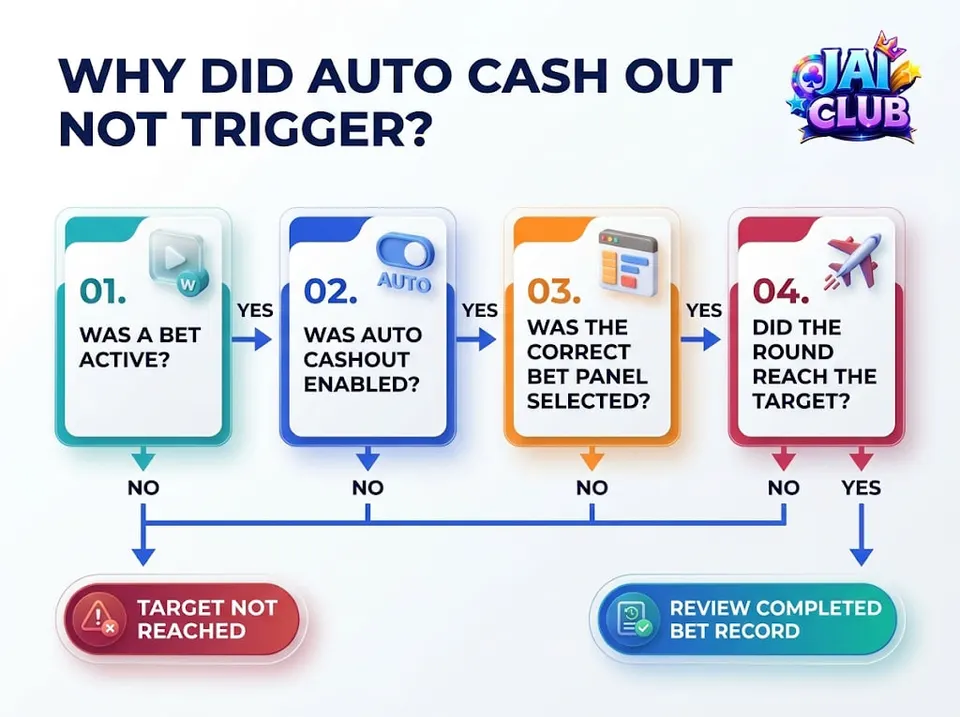
The first question is whether the round reached the configured target. If the recorded crash coefficient was below that target, the absence of an automatic settlement may be consistent with the rules.
The second question is whether an eligible bet was active. A configured target without an accepted bet does not produce a settlement. The third question is whether the correct bet panel had Auto Cashout enabled.
If these checks indicate that a target was reached but the recorded settlement appears inconsistent, the matter may require review through the operator's verified support process. A public information website cannot inspect private game records or account transactions.
Does a Higher Target Increase the Chance of a Successful Cash-Out?
No such conclusion follows from the setting. A higher target generally requires the round to continue to a higher multiplier before an automatic cash-out becomes eligible.
The target setting changes the condition for settlement, not the underlying crash coefficient. It also cannot establish whether a particular future round will reach the selected value.
Historical high multipliers are not proof that the next round is likely to continue beyond a similar target. Previous outcomes should not be treated as a dependable forecasting system.
Can Auto Cashout Be Used to Predict Aviator Results?
Auto Cashout is an execution feature, not a prediction tool. It applies a predefined condition to an eligible active bet and does not reveal the next round's crash coefficient in advance.
A game can include a Provably Fair verification system while still producing outcomes that cannot be predicted simply by observing previous multipliers. Verification and prediction are different concepts.
For a wider explanation of crash-game mechanics and result histories, explore our Crash Games Explained guide, which compares several instant multiplier formats.
Is Aviator Auto Cashout Available on Jai Club?
Aviator is a product associated with SPRIBE, but its current availability within a particular Jai Club-branded gaming lobby has not been independently confirmed by this article.
A game title appearing in search results does not prove that every similarly named platform offers the same version or interface. Readers should verify the developer and applicable rules before using feature information from another implementation.
The general principles explained here concern SPRIBE's published Aviator rules. Different crash games may have different controls and settlement conditions.
Frequently Asked Questions
Why is Aviator Auto Cash Out not working?
Possible explanations include a target that was not reached, an inactive setting, a different bet panel or an ineligible bet. The actual completed record is needed to determine the cause.
Is Auto Bet the same as Auto Cashout?
No. Auto Bet controls repeated bet placement, while Auto Cashout is a target-based settlement feature.
Does Aviator Auto Cashout guarantee a win?
No. The round may end before the selected multiplier is reached.
What happens if the crash point is below the target?
The automatic cash-out target has not been reached, so the expected target-based settlement does not occur.
Can two Aviator bet panels have different settings?
SPRIBE's documented interface supports separate bet panels. Their settings and outcomes can differ.
Does Auto Cashout work on mobile?
The feature is supported in SPRIBE's documented game interface, but the exact controls depend on the implementation.
What should I check if Auto Cashout did not trigger?
Review the target, accepted bet, relevant panel, recorded crash coefficient and completed bet history.
Can a connection issue affect the display?
Yes. Connection problems can affect visible information, although the actual settlement must be checked through the game's records.
Can Auto Cashout predict a crash point?
No. It is a settlement setting, not a forecasting system.
Does jaiclub-game.com provide Aviator support?
No. This website provides independent educational information and cannot investigate an operator's private bet records.
Final Thoughts
An Aviator Auto Cash Out not working complaint should be assessed by separating three different questions: whether a bet was accepted, whether the selected target was reached and whether the applicable bet panel had Auto Cashout enabled.
A round ending below the target does not establish a software malfunction. Other situations may require examination of the completed bet record and the specific operator's rules.
Auto Cashout remains a conditional game feature rather than a way to guarantee results. Readers can explore additional explanations through our Jai Club Crash Games category.
This article provides general technical and educational guidance about SPRIBE Aviator mechanics and does not guarantee financial returns.