APK Update Failed: Package Conflicts on Jai Club Android
Understand why a Jai Club Android APK update may fail, including package name conflicts, signature mismatches, version codes, installation sources and safe troubleshooting steps.

In this article
- Why Does a Jai Club APK Update Fail?
- Android APK Update Requirements Explained
- APK Package Conflict Ka Matlab
- What Is an Android Application ID?
- Signature Mismatch Kya Hota Hai?
- Why Is Signature Verification Important?
- Jai Club App Not Installed During Update
- Common APK Update Errors Compared
- Android Version Code Explained
- Why a Download from Another Source May Fail
- Safe Checks Before Changing Anything
- Should You Uninstall the Existing App?
- Does Clearing Cache Fix a Signature Mismatch?
- App Cache vs App Data
- What About Google Play Protect?
- APK Update vs Browser Version
- Can a Package Conflict Be a Security Warning?
- Android Update Troubleshooting Checklist
- Frequently Asked Questions
- Why did my Jai Club APK update fail?
- What does package conflict mean?
- What is a signature mismatch?
- Can clearing cache fix a signature mismatch?
- Should I uninstall the old application?
- Does the same app name mean the APK is authentic?
- Can an older APK replace a newer one?
- Is App not installed always a package conflict?
- Should I disable Android security warnings?
- Does jaiclub-game.com provide official APK technical support?
- Conclusion
- Sources and Methodology
A Jai Club APK update failed message can appear when an Android device refuses to replace an existing application with a newly downloaded package. The problem may involve an incompatible signing certificate, an application ID conflict, an older version code or another installation condition.
One important point is that an APK file with the correct-looking name is not automatically a valid update. Android verifies technical information inside the application package, and a package signed by a different developer may not be accepted as an update to the installed app.
This guide explains common APK update errors, how Android identifies applications, what a signature mismatch means and which checks can be performed without unnecessarily deleting app data. The information is based on official Android documentation and general installation behaviour, not on a claim that a particular Jai Club APK was tested.
Why Does a Jai Club APK Update Fail?
An APK update can fail for several technical reasons. The newly downloaded file may not meet Android's requirements for replacing the existing application, or the device may reject the installation for a separate compatibility or security reason.
The exact error matters. A package conflict is different from a parsing problem, insufficient storage or a blocked installation source.
A generic App not installed message does not identify one universal cause. The underlying issue should be investigated using the details shown by Android and the verified application publisher.
Android APK Update Requirements Explained
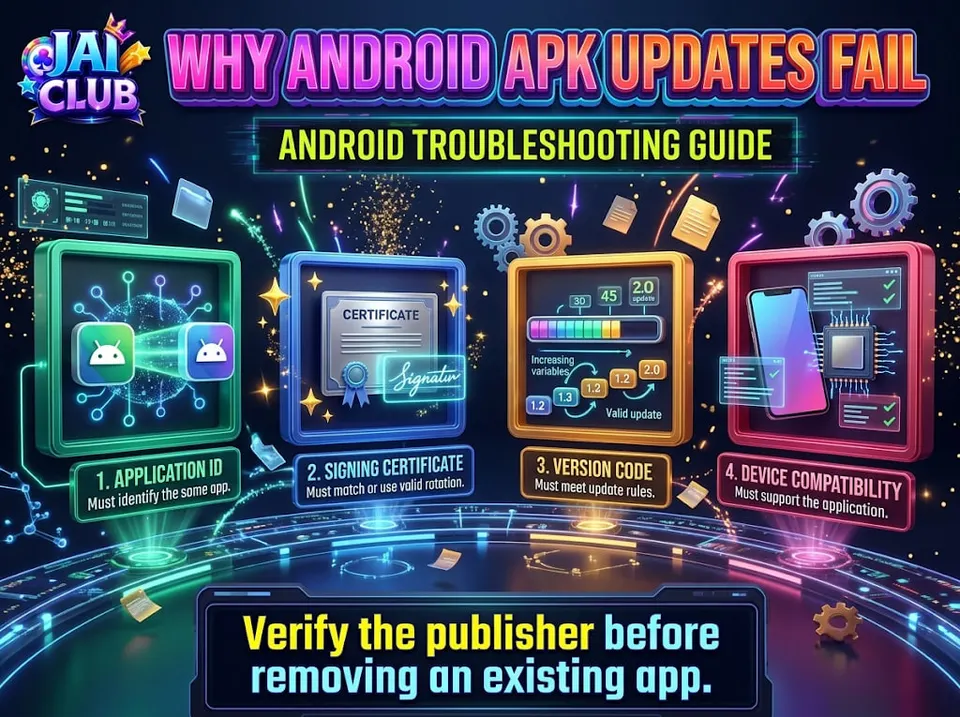
According to the official Android Developers documentation, an update normally needs to satisfy several conditions before it can replace the currently installed application.
The new package must use the same application ID as the installed application. Its signing certificate must also match, or an accepted key-rotation arrangement must be present. The update's version code must satisfy Android's version requirements.
| Requirement | Why it matters |
|---|---|
| Application ID | Identifies the app |
| Signing certificate | Verifies update continuity |
| Version code | Controls accepted version progression |
| Package integrity | Ensures the file is usable |
| Device compatibility | Determines whether the app can run |
| Installation permission | Controls whether a source may install apps |
These requirements apply to Android generally, not only to applications using the Jai Club name.
APK Package Conflict Ka Matlab
A package conflict occurs when an installation cannot proceed because of a problem involving the existing application and the new package.
For example, a file may use the same application ID as an installed app but carry a different signing certificate. Android will not normally accept such a package as a straightforward update.
This protection is important because it makes it harder for unrelated publishers to silently replace one another's applications.
A package conflict should therefore not automatically be treated as an annoying restriction to bypass. It may indicate that the downloaded file came from a different publisher or was signed using a different key.
What Is an Android Application ID?
An application ID is the unique identifier Android uses for an app. Developers commonly write identifiers in a package-style format, such as com.example.application.
Two APK files can display similar app names or icons while having different application IDs. Those files may be treated as separate applications rather than updates to one another.
Conversely, two packages with the same application ID can still fail to update if their signing certificates do not satisfy the relevant requirements.
This explains why matching the visible Jai Club logo is not sufficient to verify that two APK files belong to the same publisher.
Signature Mismatch Kya Hota Hai?
A signing certificate is part of Android's mechanism for identifying the signing identity of an application package.
When Android attempts to install an update, it checks whether the update is properly related to the already installed app. If the signing certificates do not match and no valid supported rotation applies, the update can be rejected.
The technical error may be expressed as a signature mismatch or an incompatible update package.
This is not necessarily a corrupted file. The package may be technically valid while still being incompatible with the installed application's signing identity.
Why Is Signature Verification Important?
Signature verification helps protect application continuity. Without such a check, an unrelated developer might try to distribute a replacement package using another application's identifier.
A mismatch should therefore lead to verification of the software source and publisher, not immediate removal of the protection.
An unfamiliar APK advertised as a new version could be a different product, an incorrectly distributed build or potentially malicious software.
Jai Club App Not Installed During Update
The message App not installed can be associated with several installation problems. A signing mismatch is one possibility, but it should not be assumed without supporting evidence.
Other causes may include an unsupported package, incompatible Android version, insufficient storage or a file that was not downloaded correctly.
The most useful approach is to identify the exact wording of the error before choosing a troubleshooting method.
For general Android application problems, our Jai Club App Not Opening guide explains separate symptoms such as crashes and blank screens.
Common APK Update Errors Compared
| Error or symptom | Possible explanation | Main check |
|---|---|---|
| App not installed | Multiple possible causes | Installation details |
| Package appears to conflict | Existing package incompatibility | App ID and signature |
| Signatures do not match | Signing identity differs | Verified publisher |
| Parse error | Package cannot be processed correctly | File format and compatibility |
| Older version warning | Version progression problem | Version code |
| Not enough storage | Insufficient available space | Device storage |
| Installation blocked | Device or security policy | Verified source and policy |
The table describes general Android behaviour. The actual reason for a particular failure cannot be determined from the app name alone.
Android Version Code Explained
Android applications use version information to identify releases. A user-facing version name may look like 2.0 or 3.1, while an internal version code is used for update management.
The version code is especially important because an APK labelled new in its filename does not necessarily contain a newer application build.
Android's update documentation requires the version code to satisfy its accepted progression conditions. An attempt to install an older build over a newer one may therefore be rejected or require a different supported process.
A marketing filename such as latest-app.apk does not provide trustworthy proof of version compatibility.
Why a Download from Another Source May Fail
An APK obtained from a different source may not have the same signing identity as the installed application.
This does not mean every third-party distribution is automatically unsafe. Some legitimate publishers distribute the same signed package through several channels.
However, the user should verify that the APK comes from the intended publisher and that its package identity is compatible with the installed version.
Downloading a file from a Telegram message, social media comment or unfamiliar mirror simply because it has a familiar logo does not establish authenticity.
Safe Checks Before Changing Anything
The first step is to identify the source of the application currently installed on the device. If it came from a verified store or publisher, that source is the most relevant starting point for checking an available update.
Next, check the exact error message, available storage and Android version. These details help distinguish a genuine update conflict from a general installation problem.
If the device reports a signing mismatch, repeatedly downloading random APK files is unlikely to provide a dependable solution.
Users should also avoid sharing sensitive account information with unknown people offering APK repair services.
Should You Uninstall the Existing App?
Uninstalling an app can remove its locally stored information. Android's documentation explains that replacing an incompatible app through a fresh installation may require uninstalling the existing package, but that process can erase app data.
For this reason, uninstalling should not be the first automatic step for an unexplained update failure.
Before considering removal, the user should understand whether any important information is stored locally, whether a backup exists and whether the replacement software comes from a verified publisher.
A fresh installation of an unknown package is not a safe substitute for establishing its authenticity.
Does Clearing Cache Fix a Signature Mismatch?
Clearing an application's cache may help with certain temporary display or loading problems, but it does not change the certificate used to sign an APK.
If Android rejects an update because the signing identities are incompatible, removing cached files cannot make the two certificates match.
The same distinction applies to ordinary browser cache. Browser storage has no authority to override Android package-signature verification.
This is why troubleshooting should begin with the exact error rather than using the same cache-clearing advice for every installation issue.
App Cache vs App Data
Cache generally contains temporary files that an application may recreate. App data can contain settings, local information and other files associated with the installation.
Clearing app data can therefore have more serious consequences than clearing temporary cached resources. Depending on the software, it may remove locally stored preferences or session information.
Neither action should be presented as a guaranteed solution to a package-signature conflict.
Users should understand the difference before taking any action that might remove information they need.
What About Google Play Protect?
Google Play Protect and other Android security mechanisms are intended to help protect devices from unsafe software.
A warning should not be ignored simply because a website claims that the application is popular or offers special rewards.
Disabling security protections to force-install an unfamiliar APK is not a reliable troubleshooting method. It can increase the device's exposure to malicious software.
When a warning appears, the safer response is to verify the application's publisher and distribution source.
APK Update vs Browser Version
An Android application and a mobile website use different software models. An APK is installed on the device, while a website can be opened through a compatible browser without installing a separate application package.
A user who only wants to read game information or troubleshooting guides does not need an APK for that purpose.
The independent jaiclub-game.com website provides informational articles. Its existence does not establish that a particular Android APK is officially distributed by the same organisation.
Readers should distinguish visiting an information website from installing a third-party application advertised under similar branding.
Can a Package Conflict Be a Security Warning?
Yes, in some circumstances it can indicate that the new package does not share the signing identity of the installed application.
However, a mismatch does not by itself prove malicious activity. Legitimate distribution errors and signing changes can also create incompatibilities.
The appropriate conclusion is that the two packages are not accepted as a normal update under the current conditions.
The next step should involve verifying the intended publisher rather than assuming that either package is trustworthy based only on its name.
Android Update Troubleshooting Checklist
| Check | Why it helps |
|---|---|
| Read the exact error | Distinguishes conflict from parsing or storage issues |
| Verify the publisher | Reduces risk of installing unrelated software |
| Check the source | Confirms where the APK was obtained |
| Check Android compatibility | Identifies unsupported devices |
| Check available storage | Identifies space-related installation failures |
| Review existing installation | Helps understand update identity |
| Protect local app data | Reduces risk of losing information |
| Use verified support | Provides an appropriate route for publisher-specific issues |
This checklist is intended for diagnosis, not for bypassing Android's signing or security requirements.
Frequently Asked Questions
Why did my Jai Club APK update fail?
Possible causes include a package conflict, signing mismatch, version incompatibility or another Android installation problem.
What does package conflict mean?
It indicates an incompatibility involving an existing application and a new installation package.
What is a signature mismatch?
It occurs when the signing identity of the new APK does not satisfy Android's update requirements for the installed app.
Can clearing cache fix a signature mismatch?
No. Cache clearing does not change an APK's signing certificate.
Should I uninstall the old application?
Not automatically. Uninstalling can erase local app data, so the source and consequences should be verified first.
Does the same app name mean the APK is authentic?
No. Visible names and icons are not sufficient to verify software identity.
Can an older APK replace a newer one?
Normal update rules include version-code requirements. Installing an older build may not be accepted as a standard update.
Is App not installed always a package conflict?
No. It is a general error message with several possible causes.
Should I disable Android security warnings?
Do not disable protections merely to install an unfamiliar package. Verify the publisher and the reason for the warning.
Does jaiclub-game.com provide official APK technical support?
This website provides independent educational guides and does not claim to operate or sign the application's software packages.
Conclusion
A Jai Club APK update failure should be investigated using Android's actual package requirements rather than the visible app name alone. Application ID, signing certificate and version code are important parts of the update process.
A package conflict can be caused by incompatible signing identities, while other installation errors may involve storage, compatibility or package integrity. These different issues require different explanations.
The safest approach is to verify the publisher, understand the precise error and avoid deleting app data or disabling security protections unnecessarily.
Sources and Methodology
Primary technical source: Android Developers — How App Updates Work.
Additional technical reference: Android Developers — App Signing.
This article explains documented Android behaviour. No specific Jai Club APK was downloaded, installed, signed or tested during preparation.
Related reading: Jai Club App Not Opening.