WinGo Results Different on Two Phones? Cache and Sync Checks
Learn why WinGo results may look different on two phones. Compare period IDs, game modes, completed history, browser cache, device clocks and network updates.
In this article
- Why Can WinGo Results Look Different on Two Phones?
- Start With the Same Period ID
- Phone A vs Phone B: Common Differences
- Check Whether Both Phones Use the Same WinGo Mode
- Example: Two Phones Showing Different Periods
- What If the Period IDs Are the Same?
- WinGo Result Cache: What Does It Mean?
- Can Browser Cache Show an Old WinGo Result?
- Step 1: Record Both Screens Before Changing Settings
- Step 2: Compare the Exact Website Address
- Step 3: Confirm the Game Mode and Period
- Step 4: Check the Network Connection
- Step 5: Refresh the History Carefully
- Step 6: Compare App and Browser Behaviour
- Step 7: Understand Cookies and Saved Sessions
- Step 8: Check the Phone's Date and Time
- Step 9: Distinguish Result Time From History Update Time
- Step 10: Identify a Genuine Same-Period Discrepancy
- Game History vs Personal Entry History
- What About Wallet Records?
- Can an Older App Version Cause Display Differences?
- When Clearing Cache May Be Relevant
- What If the Result Still Differs After Refreshing?
- Does a Different Display Prove Result Manipulation?
- Can a Prediction Tool Fix Different Results?
- Frequently Asked Questions
- Why are WinGo results different on two phones?
- What should I compare first?
- Can one phone show an older WinGo result?
- Does browser cache always cause result differences?
- Can Chrome and an Android app show different history?
- Should I clear all browser data immediately?
- Does a matching number mean the period is the same?
- Can two phones have different displayed timestamps?
- Does a same-period mismatch prove cheating?
- Can jaiclub-game.com correct an operator's result?
- Conclusion
- Sources and Editorial Method
WinGo results may appear different on two phones when the devices are showing different periods, game modes or versions of the result-history screen. One phone might have loaded the newest completed round while the other is still displaying an older record. A difference between two screens does not automatically mean the actual game result has changed.
The most important check is the period ID. Two devices should be compared using the same game mode and completed period before their displayed numbers or colours are compared. Without those details, even identical-looking result pages can refer to different rounds.
This troubleshooting guide explains why WinGo results may look different across two Android phones, how browser caching and delayed updates can affect the display, and how to collect useful evidence when a genuine mismatch remains unresolved. It discusses common web and app behaviour rather than claiming to have tested live Jai Club results.
Why Can WinGo Results Look Different on Two Phones?
Two smartphones do not necessarily receive or display updated information at precisely the same moment. One device may have a stable connection, while another has slower internet access or an older page loaded in memory.
A result-history section can also update separately from the main countdown or current-round display. This may cause one phone to show a recently completed number while the other continues displaying an earlier period.
Other possible causes include selecting different WinGo durations, using different website addresses, viewing separate account records or misunderstanding the time displayed on each device.
These are possible explanations, not confirmed causes of a particular result discrepancy.
Start With the Same Period ID
The period ID identifies a particular game round. It is more useful for comparison than the position of a row in a history table.
For example, the top row on Phone A may refer to period W3-0105, while the top row on Phone B refers to W3-0104. Their numbers can differ because they belong to different completed rounds.
Before concluding that the results are inconsistent, check whether both devices show the same period identifier.
A result number alone is not sufficient evidence. The number 7 can appear in many different periods without indicating that the history is duplicated or incorrect.
For a broader explanation of period identifiers, see our WinGo period number guide.
Phone A vs Phone B: Common Differences
The following table explains several situations that can make two result screens appear inconsistent.
| What you see | Possible explanation | Important check |
|---|---|---|
| Different latest number | One screen is older | Period ID |
| Same period, different number | Potential record discrepancy | Source and final status |
| Different countdown | Different game mode or refresh state | Round duration |
| One history list is shorter | Page loading or display limit | History pagination |
| One phone shows Pending | Different update stage | Completion status |
| Different timestamps | Time zone or device settings | Time reference |
| Website differs between phones | Different services or domains | Exact URL |
| App differs from browser | Separate stored sessions or rendering | Application and web source |
The table is intended to guide investigation. None of these observations is enough on its own to prove that a completed result was changed.
Check Whether Both Phones Use the Same WinGo Mode
WinGo-style services may display several durations, such as 30 seconds, one minute, three minutes and five minutes.
Each mode may maintain a separate sequence of periods and completed results. Therefore, a number displayed under a three-minute mode should not automatically be compared with one displayed under a five-minute mode.
This mistake is easy to make when the two interfaces use similar colours, buttons and history tables.
Check the mode label before comparing the result. Even a matching timestamp does not necessarily mean two different modes refer to the same round.
Our WinGo 30 Seconds vs 1 Minute comparison provides additional context about round duration and result history.
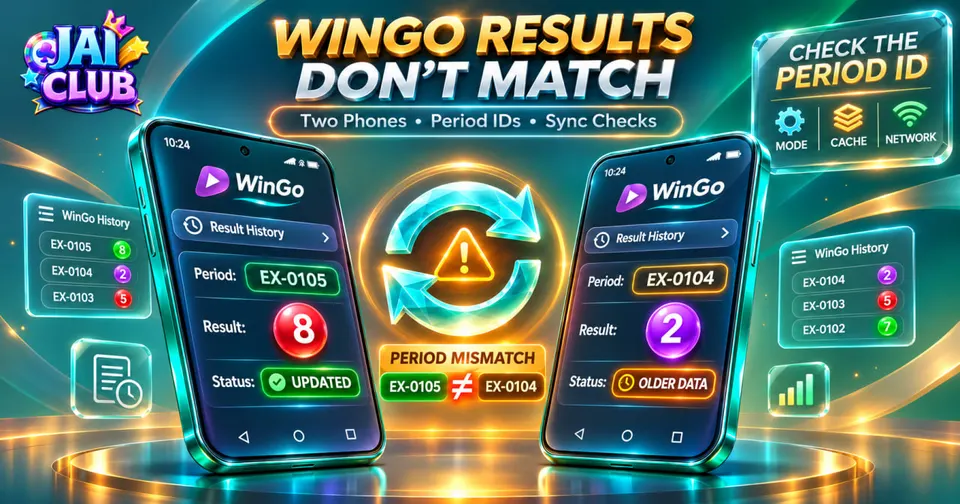
Example: Two Phones Showing Different Periods
Consider two fictional phones displaying a WinGo history screen at 10:15.
Phone A has already refreshed its completed-result list and displays W3-0105 with result 8.
Phone B still displays W3-0104 with result 2.
| Device | Displayed period | Result | Screen status |
|---|---|---|---|
| Phone A | W3-0105 | 8 | Newer history |
| Phone B | W3-0104 | 2 | Older history |
The displayed numbers are different, but there is no direct contradiction because the periods are not the same.
The correct comparison would involve finding W3-0105 on both devices after the relevant record becomes available.
These period IDs and numbers are fictional and do not represent live results.
What If the Period IDs Are the Same?
A discrepancy deserves closer attention when both devices show the same game mode, the same completed period ID and different final numbers.
For example, suppose Phone A displays completed period W3-0105 as 8, while Phone B displays the same completed period as 4.
That is a more specific issue than simply seeing different latest results.
However, the next question is whether both screens are displaying an authoritative final record. One device may still be showing a temporary or outdated interface state.
A reliable investigation needs the exact source, final status, and time the records were observed.
WinGo Result Cache: What Does It Mean?
A cache stores information that may help applications and websites load more efficiently. A browser can retain images, scripts and other webpage resources instead of downloading everything again.
Some applications also maintain local data that helps display recently accessed content.
A cached resource does not necessarily mean that the game result itself is stored permanently on the device. A website may request fresh results from its service while using cached files for the surrounding interface.
The exact caching behaviour depends on the website or application.
This is why a result screen showing old information may involve caching, a failed data request or another loading issue rather than one single universal cause.
Can Browser Cache Show an Old WinGo Result?
Yes, a web interface can display outdated information when the page has not refreshed correctly or when a required update has not reached the screen.
However, the cause should not automatically be described as a corrupt browser cache.
An interrupted network request, a frozen page component or a service-side delay can create a similar symptom.
The useful distinction is whether the displayed period changes after the interface reloads and whether the same completed period can be found in its historical records.
Deleting all browser data should not be the first response because that can remove cookies, saved sessions and other stored information.
Step 1: Record Both Screens Before Changing Settings
Begin by recording the game mode, period ID, displayed number and completion status on each device.
If the discrepancy is important, take screenshots that show these fields together.
Do not crop away the period identifier simply to focus on the result number. Without the period, a screenshot can easily be misunderstood.
Avoid sharing private account details or authentication information in public groups.
A careful initial record is valuable because clearing data or refreshing the page may change what remains visible.
Step 2: Compare the Exact Website Address
Two pages can have similar branding without belonging to the same service.
Check the complete domain shown in the browser address bar. A difference in the website address may explain why the devices show unrelated period sequences or result tables.
A familiar logo does not guarantee that two sites share the same data source.
This is particularly important when one device uses an installed application and the other opens a website in Chrome.
Do not enter credentials on an unfamiliar domain merely to test whether the results become identical.
Step 3: Confirm the Game Mode and Period
On both devices, identify the selected WinGo duration. Then locate the same completed period.
If one phone is one period behind, the issue may involve a refresh delay rather than a contradictory result.
Do not compare the current-round countdown on one device with completed history from another.
The relevant comparison must involve two records of the same round.
If the period is missing from one history list, distinguish a missing row from a row containing a different result.
Step 4: Check the Network Connection
One phone may be connected through Wi-Fi while the other uses mobile data. Their connections can have different latency, stability and access to the relevant service.
If a result page stops updating on one device, a connectivity issue is one possibility.
Check whether unrelated websites load normally. This can help determine whether the problem affects the entire connection or only the game-related interface.
A working connection does not prove that the result service itself is operating correctly.
Similarly, a slower connection does not prove that the displayed result is invalid.
Step 5: Refresh the History Carefully
A controlled refresh can help determine whether the device was displaying an outdated screen.
Use the application's ordinary history refresh or the browser's normal reload function, where available.
After refreshing, check the period number again rather than assuming that the top-row result must now be correct.
Avoid repeatedly tapping several controls at once because this makes it harder to understand which screen state was being compared.
If the page shows a loading indicator or an error, record that information separately.
Step 6: Compare App and Browser Behaviour
An installed application and a website opened in Chrome may store data and sessions differently.
The app might use an embedded web component, while Chrome maintains its own browser storage and cookies.
These differences can affect what the user sees without proving that the underlying result has changed.
However, no specific Jai Club APK architecture has been independently established for this guide.
The app versus browser access guide explains why the two environments should not be assumed to share all local settings.
Step 7: Understand Cookies and Saved Sessions
Cookies and other site data can help maintain account sessions and webpage preferences.
Google's Chrome documentation explains that deleting cookies and site data removes stored website information, while clearing cached images and files affects resources used to load pages.
These actions have different consequences.
A user who clears site data may be signed out of a website or lose stored preferences. That is why broad deletion should not be used automatically for every result mismatch.
It is better to identify the specific website and symptom before considering any storage changes.
Step 8: Check the Phone's Date and Time
A phone with incorrect date or time settings can make timestamps confusing.
Indian Standard Time is UTC+05:30. A service storing timestamps in UTC may display the same event in IST with a five-hour-and-thirty-minute offset.
For example, an event recorded at 06:00 UTC corresponds to 11:30 IST on the same date.
Different displayed times do not necessarily mean different result-generation times.
The source's actual time-zone convention should be known before converting historical timestamps.
Step 9: Distinguish Result Time From History Update Time
A round can have multiple related moments: entry closure, result completion, result publication and history refresh.
These events should not automatically be treated as one timestamp.
One phone may display the completed result before another device's history list has refreshed.
The correct question is whether both records eventually refer to the same completed period.
A visible update delay does not independently establish that the service changed the result.
Step 10: Identify a Genuine Same-Period Discrepancy
A useful report should contain the game mode, identical period ID, the differing numbers, the exact source on each device and the observation time.
The final status matters because a pending or incomplete display should not be treated as equivalent to a confirmed completed result.
For example:
| Evidence | Phone A | Phone B |
|---|---|---|
| Mode | Three minutes | Three minutes |
| Period | W3-0105 | W3-0105 |
| Result | 8 | 4 |
| Status | Completed | Completed |
| Source | Verified site | Verified site |
| Observation time | 10:15 IST | 10:15 IST |
This fictional example illustrates a discrepancy worth investigating.
It does not establish that the operator actually published conflicting results.
Game History vs Personal Entry History
A general results table may show the winning number for each completed period.
Personal entry history may show the user's own selected option, transaction status and settlement.
These sections answer different questions.
A personal entry showing the selected number 4 should not be confused with a completed public result showing number 8.
For this reason, both phones must be compared using equivalent result fields.
A mismatch between a selected number and a winning number is not the same as two devices showing different authoritative winning numbers.
What About Wallet Records?
Wallet history concerns financial movements rather than the public result itself.
A delayed settlement credit or debit does not automatically mean the completed WinGo number was changed.
If an account-related issue exists, the transaction reference and accepted period should be checked separately.
Screenshots containing private balances should not be published merely to demonstrate a result-display difference.
The result-history question and the wallet-accounting question should remain separate unless verified records establish a connection.
Can an Older App Version Cause Display Differences?
An outdated app may contain an older interface or software problem that affects loading and rendering.
However, an app version cannot be identified as the cause without knowing the actual software and observed behaviour.
Google's Android troubleshooting guidance recommends checking supported application updates and restarting the device when an installed app behaves incorrectly.
Updates should come from a verified publisher or supported distribution channel.
Downloading an unknown APK advertised as a result-sync fix creates unnecessary security risk.
When Clearing Cache May Be Relevant
Clearing temporary cached files may help when a problem involves stale or damaged resources.
However, cache clearing does not repair every network problem, server issue or application error.
It also does not provide a way to change an authoritative result.
Before clearing stored information, consider whether the history can be checked through an ordinary refresh or another trusted view.
Google's official Android guidance also distinguishes cache clearing from removing application data. The latter can remove local information.
What If the Result Still Differs After Refreshing?
If both devices still show conflicting final values for the same period, preserve the evidence before taking further action.
Confirm the exact domain or app publisher and check whether the records are genuinely final.
A service's authorised support channel may be able to investigate its underlying records.
An independent information website cannot access an operator's internal result database.
Without that access, a discrepancy can be described and documented, but its definitive technical cause may remain unknown.
Does a Different Display Prove Result Manipulation?
No. Two screenshots showing different values are evidence of a display difference, but they do not by themselves establish why the difference exists.
Possible causes include comparing the wrong period, different modes, stale content or an actual record inconsistency.
Determining manipulation would require stronger evidence about the authoritative completed result and how the system generated or published it.
Readers should avoid using a single inconsistent screenshot as proof of either fairness or manipulation.
Can a Prediction Tool Fix Different Results?
A prediction tool cannot reliably repair a browser, synchronise two devices or determine an authoritative completed result.
Claims that a special panel or script can reveal the true number should not replace ordinary record verification.
A proper investigation identifies the same period and authoritative result source.
Historical number patterns and third-party prediction claims are different subjects from technical display consistency.
Frequently Asked Questions
Why are WinGo results different on two phones?
The devices may show different periods, game modes, refresh states or data sources. A genuine same-period discrepancy requires further investigation.
What should I compare first?
The game mode and full period ID.
Can one phone show an older WinGo result?
Yes. A screen that has not refreshed may continue displaying an earlier completed period.
Does browser cache always cause result differences?
No. Network, application and service-side problems are also possible.
Can Chrome and an Android app show different history?
They may display different local states or sessions. The underlying source must be checked before concluding why.
Should I clear all browser data immediately?
No. Clearing cookies and site data can remove sessions and saved website information.
Does a matching number mean the period is the same?
No. Different periods can produce identical result digits.
Can two phones have different displayed timestamps?
Yes. Device settings, time zones and refresh timing can affect timestamp presentation.
Does a same-period mismatch prove cheating?
No. It is a discrepancy requiring reliable evidence, not proof of a particular cause.
Can jaiclub-game.com correct an operator's result?
No. This independent information website cannot change live game outcomes or internal account records.
Conclusion
When WinGo results appear different on two phones, the first priority is to identify whether both devices are showing the same game mode, completed period and authoritative result field.
Many apparent differences arise because one screen is older or the devices are displaying separate types of history. A genuine conflict involving the same completed period should be documented carefully rather than explained through guesses.
The most useful evidence includes the period ID, game mode, source, displayed number, status and observation time. This method helps readers distinguish display problems from unresolved result-record discrepancies without treating past numbers as predictions.
Sources and Editorial Method
Technical guidance is based on Google's Chrome documentation about cached files, cookies and site data, together with Google's Android application troubleshooting guidance.
All example period identifiers and result numbers are fictional.
No live WinGo results, Jai Club account records or device-specific APK implementations were independently tested.